---
title: "WooCommerce checklist for ChatGPT and Google AI shopping"
description: "What ChatGPT shopping and Google AI Mode read from a WooCommerce store: crawler access, Product markup, GTINs, descriptions, plugins and caching."
url: https://citedin.io/blog/wordpress-woocommerce-ai-shopping-checklist
language: en
author: "Pablo Bravo"
date: 2026-11-24
updated: 2026-11-24
category: "WordPress and WooCommerce"
translation: https://citedin.io/es/blog/checklist-wordpress-woocommerce-compras-ia
---
# WooCommerce checklist for ChatGPT and Google AI shopping
> What ChatGPT shopping and Google AI Mode read from a WooCommerce store: crawler access, Product markup, GTINs, descriptions, plugins and caching.
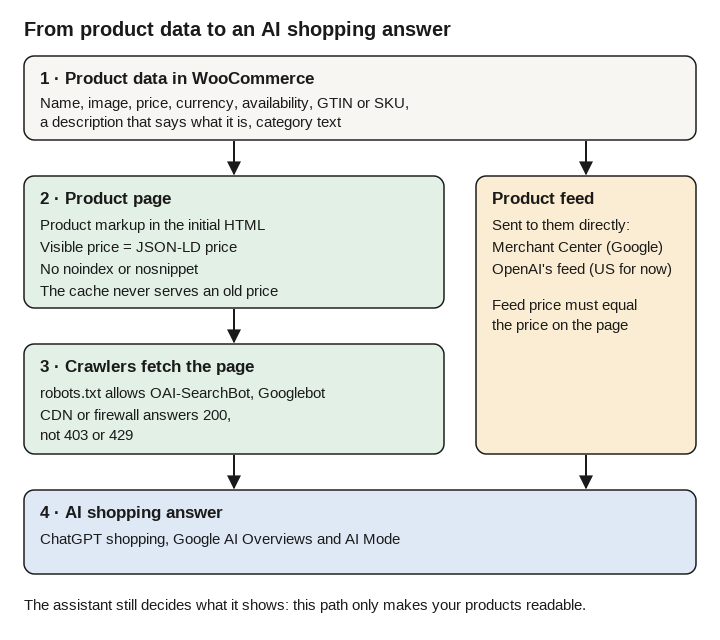
ChatGPT and Google's AI Mode build their product answers from two kinds of data: your product pages, and product feeds sent to them directly. On a WordPress and WooCommerce store, the work is the same for both: let their crawlers in, publish complete Product markup that matches the page, write descriptions that say what each product is, give categories real text, and stop caches from serving old prices.
This checklist goes item by item, with how to check each one on your own store. Where OpenAI, Google, WooCommerce or an SEO plugin documents a rule, you get their words and a link in the Sources list. Where a step is our advice rather than a documented rule, it says so.
## Key takeaways
- OpenAI says ChatGPT's product results "are not ads" and that merchants are ranked on "availability, price, quality, and whether they are the maker or primary seller of that item."
- As of 24 November 2026, OpenAI's merchants page says "Shopping is currently live for ChatGPT users in the U.S.", and its standard feed upload "currently targets the US".
- Google's merchant listing markup requires only name, image, price and currency; it recommends GTIN, brand, availability, shipping and returns, and Product markup "in the initial HTML".
- WooCommerce 11.3.1 writes its own Product markup with SKU, GTIN, price and availability, but the file has no brand property, so brand comes from an SEO plugin or a filter.
- Google Merchant Center says a price "passed dynamically with JavaScript after the page is loaded" triggers an error; a cached page with an old price can cause the same mismatch.
## Where do ChatGPT and Google AI Mode get product data?
Both read structured product data: what your pages declare and what feeds send them.
### ChatGPT
OpenAI's help page on shopping says "Product results are not ads" and "Ads are separate from product results." To choose products, ChatGPT uses "Structured metadata from first-party and third-party providers (e.g., price, product description) and other third-party content." Merchants "are ranked based on factors like availability, price, quality, and whether they are the maker or primary seller of that item."
There are two ways your catalogue reaches it. Shopify and Etsy stores are already connected: "your catalog is already integrated, and no additional setup or application is required." Every other store, WooCommerce included, can read OpenAI's product feed documentation and apply for direct feed access through a form on chatgpt.com/merchants.
Three details matter for a European store, as of 24 November 2026:
- **The program is U.S. first.** The merchants page says "Shopping is currently live for ChatGPT users in the U.S." OpenAI's feed reference adds that "The standard OpenAI-format upload currently targets the US."
- **Self-service is not open yet.** OpenAI says it is building "a merchant platform for self-serve data integration later this year".
- **Checkout stays on your site.** OpenAI says it is "moving away from a standalone Instant Checkout experience in ChatGPT" in favour of "merchant-owned checkout experiences."
As we read it, a WooCommerce store outside the U.S. reaches ChatGPT today mostly through its own pages, read by OpenAI's search crawler, and through third-party product data. That makes the page-side items below the part you control now.
### Google AI Overviews and AI Mode
Google describes AI Mode shopping as bringing "together Gemini capabilities with our Shopping Graph". In May 2025 Google said the Shopping Graph held "more than 50 billion product listings" and that "every hour more than 2 billion of those product listings are refreshed." Those features were announced for AI Mode in the U.S. first.
Google documents two ways to give it product data: "Include structured data in your site's product pages" and "Tell Google directly which products you want to show on Google by uploading a feed" in Merchant Center. Its ecommerce guide recommends doing both. For AI Overviews and AI Mode in general, Google sets no extra requirement: a page "must be indexed and eligible to be shown in Google Search with a snippet".
## Can OpenAI's and Google's crawlers reach your product pages?
Your product pages count only if the crawlers can fetch them. For ChatGPT that crawler is OAI-SearchBot; for Google it is Googlebot, and the page must be indexable with a snippet.
### robots.txt
OpenAI says sites opted out of OAI-SearchBot "will not be shown in ChatGPT search answers, though can still appear as navigational links." After a robots.txt change, "it can take ~24 hours from a site's robots.txt update for our systems to adjust."
Do not confuse it with GPTBot. OpenAI says GPTBot crawls "content that may be used in training our generative AI foundation models." Blocking GPTBot is a choice about training, and it does not take you out of ChatGPT search. Our [guide to AI crawlers and robots.txt](https://citedin.io/blog/ai-crawlers-robots-txt-guide) lists the other assistants' crawlers and what blocking each one changes.
To allow OAI-SearchBot on the whole store, a group like this is enough:
- `User-agent: OAI-SearchBot`
- `Allow: /`
On WordPress, robots.txt is often a virtual file written by WordPress or your SEO plugin. Open `yourstore.com/robots.txt` to see what crawlers really receive, or let our [AI crawler checker](https://citedin.io/tools/ai-crawlers) read it.
### Firewall, CDN and security plugins
A robots.txt that says yes does not help if the firewall says no. A crawler that gets a 403 or a challenge page cannot read the product. OpenAI publishes the IP ranges of each crawler as JSON files, so your host can allow requests from them.
If your store runs behind Cloudflare, look at **Security › Settings**, filtered by bot traffic, then **AI Crawler and Agent access policies**. Cloudflare sorts AI traffic into Search, Agent and Training, and for newly added domains all three are "Allow (do not block)" by default. Anyone with access can change that later, and other bot rules can still block a crawler, so check rather than assume.
### noindex and snippets
Google's AI features use only pages that are indexed and may show a snippet. Check that product and category pages carry no `noindex`, `nosnippet` or tiny `max-snippet`. SEO plugins set these per content type, so check the product and product category settings, not only single pages.
**How to check:** open robots.txt; run a product URL through Search Console's URL Inspection; search your server's access log for `OAI-SearchBot` and `Googlebot` and look at the status codes they got. A run of 403 or 429 answers means the firewall, not robots.txt, is the problem.
## Does your Product markup carry price, currency, availability and identifiers?
Each product page should carry one Product block in JSON-LD with an Offer holding the price, the currency and the stock status, plus brand and GTIN where they exist. That block must match what a visitor sees on the page.
### What Google and OpenAI ask for
Google's merchant listing documentation requires only `name`, `image`, and an `offers` Offer with `price` and `priceCurrency` (ISO 4217, such as EUR or USD). It recommends `brand.name`, `gtin`, `sku` and `description` on the Product, and `availability`, `itemCondition`, `shippingDetails`, `hasMerchantReturnPolicy` and `priceValidUntil` on the Offer. Its eligible pages are those "where a shopper can purchase a product".
OpenAI's product feed lists its required fields: `item_id`, `title`, `description`, `url`, `brand`, `seller_name`, `image_url`, `availability`, `price`, `target_countries` and `store_country`. Even without a feed, the list shows which product facts OpenAI treats as basic. Price goes as an amount and a three-letter currency code; availability is one of `in_stock`, `out_of_stock`, `pre_order`, `backorder` or `unknown`.
### GTINs: real ones or none
Both companies say the same thing about barcodes. OpenAI: "Do not invent a value to replace a missing GTIN." Google: "Only provide a GTIN if you're sure it's correct. When in doubt don't provide a GTIN (for example, don't guess or make up a value)."
Many products have no GTIN, and that is fine. Google lists store brands, custom items, bundles you created and digital downloads. For a store brand, Google advises sending brand and MPN instead.
### What WooCommerce writes by itself
WooCommerce prints its own Product JSON-LD on product pages. We read the code of WooCommerce 11.3.1, released on 19 November 2026, to see what it contains:
- **description**: the product's short description if it has one, otherwise the long description, with HTML stripped.
- **sku**: the SKU, or the WordPress product ID when the SKU field is empty.
- **gtin**: the value of the "GTIN, UPC, EAN or ISBN" field (Inventory tab, added in WooCommerce 9.2), only when it is 8, 12, 13 or 14 digits after non-digits are removed.
- **offers**: price, currency and availability from the stock status, with `priceValidUntil` set to the end of next year unless a sale has an end date.
- **variations**: an AggregateOffer with the price range, or one exact Offer when the URL selects a single variation. The code comment says this avoids Merchant Center "price mismatch" disapprovals.
- **returns**: since 11.3.0, a MerchantReturnPolicy link, printed only on the page you chose as your refund and returns policy.
The 11.3.1 file has no `brand` property and no shipping details on the Offer. If you want brand in the markup, it has to come from an SEO plugin or the `woocommerce_structured_data_product` filter.
Two consequences follow. First, an empty SKU means the markup's `sku` is an internal number; fill SKUs so your page, your feed and Merchant Center use the same code. Second, the short description is what the markup says the product is, so a short description like "Free delivery this week" becomes your product description for machines.
### Shipping and returns
Google recommends one standard policy for the whole store instead of repeating it on every product. Shipping goes in a `ShippingService` under `Organization`, through `hasShippingService`; returns go in a `MerchantReturnPolicy` under `Organization`. You can also set both in Merchant Center or Search Console, and those settings win over markup when they disagree.
OpenAI's feed carries the same facts as fields: `shipping_price`, `shipping`, `accepts_returns`, `return_deadline_in_days` and `return_policy`.
**How to check:** view a product page's source and search for `application/ld+json`. Count the blocks with `"@type": "Product"`: there should be one. Then run the URL through Google's Rich Results Test and URL Inspection. Our [schema checker](https://citedin.io/tools/schema-checker) and [product page check](https://citedin.io/tools/product-check) read the same markup and list what is missing.
Before you change anything, you can see what ChatGPT, Perplexity and Google AI Overviews say about your store today: 8 buyer questions, 24 answers, free.
## Which Yoast, Rank Math, SEOPress and AIOSEO settings matter?
Each of the four plugins can add the fields WooCommerce leaves out, mainly brand and global identifiers. In the documentation we read, identifiers sit mostly in paid editions or add-ons.
- **Yoast.** Identifiers need the paid Yoast WooCommerce SEO add-on, version 15.2 or later. You enter them in the "Yoast SEO" tab of the product's Product data box, and for variations under "Yoast SEO options". Brand is set in Yoast SEO › WooCommerce SEO › Schema & OpenGraph additions › Product Brand.
- **Rank Math.** Brand is set in Rank Math SEO › General Settings › WooCommerce › Select Brand, from a product taxonomy; a custom brand name is PRO. The Global Identifier setting (PRO) picks the GTIN type, and the value comes from WooCommerce's own field on the Inventory tab.
- **SEOPress.** SEOPress PRO maps Product schema properties to WooCommerce fields, including Product Brand and Product Global Identifiers, and lets you type a value where no field exists.
- **AIOSEO.** Product schema is in All in One SEO Pro, Basic plan or above. Its Identifiers section takes SKU, GTIN, MPN and ISBN, and it reads brand from WooCommerce Brands or Perfect Brands.
Three settings deserve a closer look:
- **One Product block, not two.** SEOPress tells you to tick "Remove WooCommerce Schemas", because you "cannot optimize or otherwise modify the content that WooCommerce provides." With other plugins, check the page source: two Product blocks with different prices describe two different products.
- **Brand as shown on the page.** OpenAI's feed defines brand as "Product brand as shown on the product page." Map it from a real brand taxonomy or attribute, not from your store name, unless you make the product.
- **AIOSEO's "Autogenerate Fields".** With it on, AIOSEO fills most of the product schema from WooCommerce data. With it off, you maintain every field by hand, and a price typed into the schema goes stale the day the real price changes.
## Does each product description say what the product is?
A product description should state, in the first lines, what the product is, what it is made of, its size and who it is for. Google and OpenAI both ask for factual text, not promotion.
Google's Merchant Center rules for descriptions list what to include, such as size, material, intended age range, special features and technical specifications. Google advises putting "the most important details in the first 160 - 500 characters." It also lists what to leave out: promotional text such as price, sale dates or shipping, links to your store or other sites, comparisons with other products, and your business's history or policies.
OpenAI's feed asks for a "Factual product description" in plain text, with titles up to about 150 characters and descriptions up to about 5,000.
Here is an example, invented for this post. A ceramic mug whose short description reads "Our bestseller. Order today for free delivery." tells a machine nothing about the mug. "Stoneware mug, 350 ml, hand-glazed in matt green, dishwasher and microwave safe" answers the questions a buyer asks an assistant: size, material, care.
On WooCommerce, start with the short description, because the markup uses it first. Then find products with no description at all: our [product page check](https://citedin.io/tools/product-check) flags them one page at a time.
## Do your category pages have real text?
A category page should open with two to four sentences on what the category holds, who it is for and how its products differ. That is an editorial convention, not a documented ranking rule, but an empty category page gives an assistant nothing to quote.
WooCommerce has a field for it. Its documentation describes the category Description as optional and says "some themes display this", most often under the category name. Fill it in, then open the category page to confirm your theme shows it.
Google adds a structural point. "If category pages don't include direct links to all products in a category, Googlebot might not find all of your products by crawling alone." It asks for real `` links, not JavaScript events. If a "load more" button hides products from crawlers, Google names your sitemap and a Merchant Center feed as the fallback.
## Can caching or a CDN serve the wrong price?
Yes. A page cache, a CDN or a script that fills in the price after load can show crawlers a price or stock status that no longer matches the product. Google treats a mismatch between the feed and the page as an error.
Google's merchant listing guide is direct: "dynamically-generated markup can make Shopping crawls less frequent and less reliable, which can be an issue for fast-changing content like product availability and price." It recommends "putting Product structured data in the initial HTML". Merchant Center's help on mismatched prices adds: "If data on your website is passed dynamically with JavaScript after the page is loaded, this will trigger an error," and "Prices reflected in the HTML need to match exactly the prices uploaded in Merchant Center."
WooCommerce's caching guide covers what must never be cached: Cart, My Account and Checkout, and five cookies such as `woocommerce_cart_hash` and `wp_woocommerce_session_`. It says nothing on purging product pages when price or stock changes, so test your own cache and CDN.
Three pitfalls to test for on a WooCommerce store:
- **A full-page cache that is not purged on stock changes.** The product sells out, the cached page still says in stock.
- **Currency or geo-pricing plugins.** The crawler sees one currency, your feed says another. Google asks you to "use the appropriate currency for the country that you're targeting."
- **Sales that end in one place only.** OpenAI asks you to "update the feed when a sale starts or ends"; a sale over in the feed but not in the cached page gives two prices.
**How to check:** change a test product's price, open the product in a private window, view the source and compare three numbers: the visible price, the JSON-LD price and the feed price. Repeat after it sells out.
## The checklist on one page
| Item | What to check | Documented by |
| --- | --- | --- |
| OAI-SearchBot allowed | robots.txt group; access log shows 200, not 403 or 429 | OpenAI crawler docs |
| Pages indexable with a snippet | No noindex, nosnippet or tiny max-snippet on products and categories | Google AI features |
| Firewall and CDN | AI search crawlers allowed; IP ranges not blocked | OpenAI; Cloudflare |
| One Product block per page | name, image, price, priceCurrency; brand, gtin, sku, availability | Google merchant listing |
| Real GTINs only | Valid 8, 12, 13 or 14 digits, or none; brand and MPN for store brands | Google; OpenAI feed spec |
| Shipping and returns | One store-wide policy in markup or in Merchant Center | Google shipping and return docs |
| Factual descriptions | Short description says what it is; no promotion or links | Merchant Center; OpenAI feed spec |
| Category text and links | Description visible; products linked with `` | WooCommerce; Google ecommerce |
| Prices in the initial HTML | Visible price = JSON-LD price = feed price, after a change | Google; Merchant Center |
## What can CitedIn check and fix on a WooCommerce store?
CitedIn runs these catalogue checks every day on a connected store: GTIN and SKU, missing product descriptions, empty category texts and the Product and Offer JSON-LD. Its agent works through up to 20 products a day per card, on catalogues of up to 5,000 products, in the working mode you choose.
It changes product and category text and structured data; it never touches orders, customers, users, payments, plugins or your theme, and every change can be undone for 30 days. It will not invent a GTIN, and it cannot make ChatGPT or Google pick your product: nobody can promise that.
If you want to go further:
- [How CitedIn works on WooCommerce stores](https://citedin.io/woocommerce), and on [WordPress sites in general](https://citedin.io/wordpress).
- [Check one product page now](https://citedin.io/tools/product-check), free.
- [What it costs per site](https://citedin.io/pricing).
## Sources
- OpenAI Help Center, "Shopping with ChatGPT Search", https://help.openai.com/en/articles/11128490 (read 2026-11-24)
- OpenAI, ChatGPT merchants page, https://chatgpt.com/merchants/ (read 2026-11-24)
- OpenAI, product feed schema reference, https://developers.openai.com/commerce/specs/file-upload/products (read 2026-11-24)
- OpenAI, crawler documentation (OAI-SearchBot, GPTBot, ChatGPT-User, OAI-AdsBot), https://developers.openai.com/api/docs/bots (read 2026-11-24)
- Google, "Shop with AI Mode, use AI to buy and try clothes on yourself virtually" (20 May 2025), https://blog.google/products/shopping/google-shopping-ai-mode-virtual-try-on-update/ (read 2026-11-24)
- Google Search Central, "AI features and your website", https://developers.google.com/search/docs/appearance/ai-features (read 2026-11-24)
- Google Search Central, "Share your product data with Google", https://developers.google.com/search/docs/specialty/ecommerce/share-your-product-data-with-google (read 2026-11-24)
- Google Search Central, merchant listing (Product, Offer) structured data, https://developers.google.com/search/docs/appearance/structured-data/merchant-listing (read 2026-11-24)
- Google Search Central, shipping policy structured data, https://developers.google.com/search/docs/appearance/structured-data/shipping-policy (read 2026-11-24)
- Google Search Central, merchant return policy structured data, https://developers.google.com/search/docs/appearance/structured-data/return-policy (read 2026-11-24)
- Google Search Central, "Help Google understand your ecommerce site structure", https://developers.google.com/search/docs/specialty/ecommerce/help-google-understand-your-ecommerce-site-structure (read 2026-11-24)
- Google Merchant Center Help, description attribute, https://support.google.com/merchants/answer/6324468 (read 2026-11-24)
- Google Merchant Center Help, GTIN attribute, https://support.google.com/merchants/answer/6324461 (read 2026-11-24)
- Google Merchant Center Help, "How to fix: Mismatched product price", https://support.google.com/merchants/answer/12159029 (read 2026-11-24)
- Cloudflare, AI crawler and agent access policies, https://developers.cloudflare.com/bots/additional-configurations/block-ai-bots/ (read 2026-11-24)
- WooCommerce, structured data code at release 11.3.1 (class-wc-structured-data.php), https://github.com/woocommerce/woocommerce/blob/11.3.1/plugins/woocommerce/includes/class-wc-structured-data.php (read 2026-11-24)
- WooCommerce, "WooCommerce 9.2: a better experience for all users" (GTIN field), https://developer.woocommerce.com/2024/08/21/woocommerce-9-2-a-better-experience-for-all-users/ (read 2026-11-24)
- WooCommerce, GTIN documentation, https://woocommerce.com/document/gtin/ (read 2026-11-24)
- WooCommerce, managing product categories, tags and attributes, https://woocommerce.com/document/managing-product-taxonomies/ (read 2026-11-24)
- WooCommerce, configuring caching plugins, https://developer.woocommerce.com/docs/best-practices/performance/configuring-caching-plugins (read 2026-11-24)
- Yoast, "How to add product identifiers with WooCommerce SEO", https://yoast.com/help/how-to-add-product-identifiers-with-woocommerce-seo/ (read 2026-11-24)
- Yoast, "How to add Brand, Manufacturer, Color, Pattern, and Material attributes to your WooCommerce products", https://yoast.com/help/how-to-add-custom-attributes-to-your-products/ (read 2026-11-24)
- Rank Math, "How to Use Product Schema for WooCommerce Products", https://rankmath.com/kb/woocommerce-product-schema/ (read 2026-11-24)
- Rank Math, GTIN and MPN for WooCommerce, https://rankmath.com/kb/gtin-mpn-woocommerce (read 2026-11-24)
- SEOPress, "Optimize product schema for WooCommerce", https://www.seopress.org/newsroom/featured-stories/optimize-product-schema-woocommerce/ (read 2026-11-24)
- All in One SEO, "Setting Product Schema Markup in Your Content", https://aioseo.com/docs/setting-product-schema-markup-in-your-content/ (read 2026-11-24)