On this page
- Which AI crawlers visit your site, and what does each one do?
- Which crawlers decide whether an assistant can cite you?
- Which crawlers collect training data, and what does blocking them change?
- What about fetchers that act for a user?
- How do you write robots.txt rules for AI crawlers?
- How can Cloudflare or a firewall block AI crawlers without you knowing?
- How do you check which AI crawlers reach your site?
- What should you change this week?
If you want AI assistants to cite your site, allow their search crawlers: OAI-SearchBot, Claude-SearchBot, PerplexityBot, Googlebot, Bingbot and Applebot. Decide separately whether your content may train models (GPTBot, ClaudeBot, Google-Extended, Applebot-Extended). Then check that your CDN or firewall lets the search crawlers through: a 403 or a challenge page stops them whatever robots.txt says.
Every rule below comes from the vendor's own documentation or from the robots.txt standard, RFC 9309, read on 24 November 2026. Crawler names and policies change, so the Sources list at the end links each page and gives the date we read it.
Key takeaways
- OpenAI says sites that opt out of OAI-SearchBot "will not be shown in ChatGPT search answers", while disallowing GPTBot only signals that your content should not be used for training.
- Blocking ClaudeBot does not block Claude-SearchBot: Anthropic runs separate crawlers for training, search and user requests, each with its own robots.txt name.
- Google-Extended has no effect on Google Search, but Google's documentation says it also covers grounding in the Gemini app, not only Gemini training.
- In Cloudflare, the AI "Training" policy also covers mixed-purpose crawlers used for both training and search, and Bot Fight Mode cannot be skipped with WAF custom rules.
- Fetchers that act on a user's request, such as ChatGPT-User and Perplexity-User, may not follow robots.txt; only server or CDN rules stop them.
Which AI crawlers visit your site, and what does each one do?
AI companies send crawlers for three different jobs: building a search index that their assistant cites, collecting training data, and fetching a page because a user asked. Each job has its own name in robots.txt, so one rule can let a company cite you while keeping your pages out of its training data.
| Crawler or token | Company | What it does | If you disallow it in robots.txt |
|---|---|---|---|
| OAI-SearchBot | OpenAI | Search results in ChatGPT | Your site is not shown in ChatGPT search answers (navigational links still possible) |
| GPTBot | OpenAI | Training data | Signals that your content should not be used for training |
| ChatGPT-User | OpenAI | Fetches a page when a user asks | OpenAI says robots.txt rules "may not apply"; it does not decide what appears in search |
| Claude-SearchBot | Anthropic | Search results in Claude | "May reduce your site's visibility and accuracy in user search results" |
| ClaudeBot | Anthropic | Training data | Your future pages are excluded from training datasets |
| Claude-User | Anthropic | Fetches a page when a user asks | Claude cannot retrieve your page for a user's question |
| PerplexityBot | Perplexity | Search results in Perplexity; not used for training | Perplexity recommends allowing it to appear in results |
| Perplexity-User | Perplexity | Fetches a page when a user asks | Perplexity says it "generally ignores robots.txt rules" |
| Googlebot | Google Search, including AI Overviews and AI Mode | Your pages cannot be crawled for Search or its AI features | |
| Google-Extended | A token, not a crawler: Gemini training and grounding in the Gemini app | No effect on Google Search, by Google's own statement | |
| Bingbot | Microsoft | Bing search, Copilot and Bing's grounding results | Bing lists blocking it among the things to avoid |
| Applebot | Apple | Spotlight, Siri and Safari search; data may also train Apple's models | Out of Apple's search features |
| Applebot-Extended | Apple | A token, not a crawler: training of Apple's foundation models | "Webpages that disallow Applebot-Extended can still be included in search results" |
Two of these names never appear in your logs. Google says Google-Extended "doesn't have a separate HTTP request user agent string" and is used "in a control capacity". Apple says "Applebot-Extended does not crawl webpages." Both only work as lines in robots.txt that the main crawler reads.
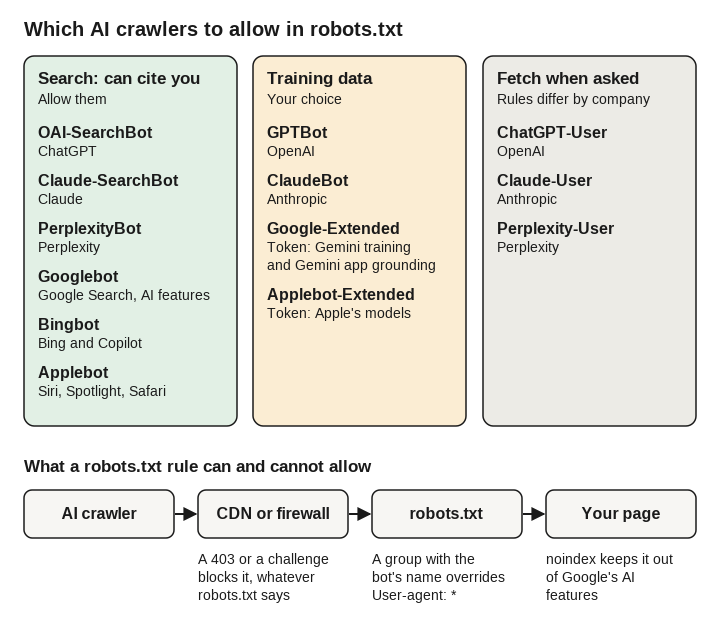
Which crawlers decide whether an assistant can cite you?
The search crawlers decide it: if an assistant's search crawler cannot fetch your pages, that assistant has little to quote from your site. Training crawlers feed future models; they do not build the index an assistant searches when it answers.
Here is the crawler that matters for each assistant, in the vendors' words:
- ChatGPT: OAI-SearchBot. OpenAI says "Sites that are opted out of OAI-SearchBot will not be shown in ChatGPT search answers, though can still appear as navigational links." It recommends allowing it in robots.txt and "allowing requests from our published IP ranges".
- Claude: Claude-SearchBot, which "navigates the web to improve search result quality for users". Disabling Claude-User also "may reduce your site's visibility for user-directed web search."
- Perplexity: PerplexityBot. "To ensure your site appears in search results, we recommend allowing PerplexityBot in your site's robots.txt file and permitting requests from our published IP ranges."
- Google AI Overviews and AI Mode: Googlebot. A page must be "indexed and eligible to be shown in Google Search with a snippet", and Google adds: "There are no additional technical requirements."
- Gemini app: grounding there is governed by Google-Extended (next section), on top of what Googlebot crawls.
- Copilot: Bingbot. Bing's Webmaster Guidelines cover "Bing search experiences, Copilot, and grounding API results" and list "Blocking Bingbot in your robots.txt file" under things to avoid.
- Siri, Spotlight and Safari: Applebot. "Enabling Applebot in robots.txt allows website content to appear in search results for Apple users around the world in these products."
OpenAI does not say which outside search providers ChatGPT uses, so guides that tell you to allow Bingbot "for ChatGPT" go further than OpenAI's documentation. Allow Bingbot for Bing and Copilot, which Microsoft does document.
Which crawlers collect training data, and what does blocking them change?
GPTBot, ClaudeBot, Google-Extended and Applebot-Extended are the training controls. Blocking them is a licensing choice about your content. For OpenAI, Anthropic and Apple, the vendor's page describes the training control as separate from search.
OpenAI states it plainly: "Each setting is independent of the others", so you can allow OAI-SearchBot "while disallowing GPTBot". Apple says pages that disallow Applebot-Extended "can still be included in search results". Anthropic says restricting ClaudeBot "signals that the site's future materials should be excluded from our AI model training datasets."
The Google-Extended trade-off
Google-Extended is the one training control that also touches answers. Google's crawler page says it manages use for "training future generations of Gemini models" and "for grounding (providing content from the Google Search index to the model at prompt time…) in Gemini Apps".
It also says "Google-Extended does not impact a site's inclusion in Google Search nor is it used as a ranking signal in Google Search." Read together: disallowing Google-Extended leaves AI Overviews and AI Mode alone, but asks Google not to ground Gemini app answers in your pages. If Gemini matters to your buyers, weigh that before you add the line.
Bing has no separate training name
Microsoft documents no training token for robots.txt. Its controls are two robots meta values, announced in September 2023 and still in its current guidelines:
- NOCACHE: Copilot uses "only the URL, title, and snippet", and the 2023 post says only those may be used for training.
- NOARCHIVE: "prevents content from being used in Copilot responses and grounding results", and the 2023 post says Microsoft "will not use the content for training".
Both keep your page in Bing's normal results. With Bing, you cannot refuse training without also leaving Copilot's answers.
Newer preference signals
As of 30 October 2026, Anthropic says it honours a machine-readable "no AI training" preference based on an IETF draft. A robots.txt rule that names ClaudeBot still takes priority over it. Google says it "intends to support the AIPREF shared machine-readable training preference signal" in early 2027. Cloudflare's managed robots.txt writes its own "Content-signal" line. The crawler pages of OpenAI, Perplexity and Apple, and Bing's guidelines, did not mention these signals when we read them, so keep the named groups as your main control.
What about fetchers that act for a user?
User-triggered fetchers open a page because a person asked an assistant to, and several vendors say robots.txt may not apply to them. If you want them blocked, you need a server or CDN rule; if you want them in, make sure nothing challenges them.
- ChatGPT-User: "Because these actions are initiated by a user, robots.txt rules may not apply." OpenAI adds that it "is not used to determine whether content may appear in Search."
- Perplexity-User: "Since a user requested the fetch, this fetcher generally ignores robots.txt rules."
- Google's user-triggered fetchers, including Google-Agent: "these fetchers generally ignore robots.txt rules."
- Claude-User is the exception that does follow robots.txt. Anthropic says "Disabling Claude-User on your site prevents our system from retrieving your content in response to a user query."
How do you write robots.txt rules for AI crawlers?
Write one group per decision: a User-agent line for each crawler, then the Allow or Disallow lines that apply to them. RFC 9309, the standard published by the IETF in September 2022, sets how crawlers read those groups.
The RFC 9309 rules that trip people up
- A named group replaces the
*group. A crawler obeys the group that matches its name, matched without regard to case. It falls back toUser-agent: *only when no group names it. - Groups for the same name merge. If two groups name OAI-SearchBot, their rules "MUST be combined into one group".
- The longest path wins. "The most specific match is the match that has the most octets." If an
Allowand aDisalloware equal, theAllowshould win. - No matching rule means allowed. A URL that no rule in the group matches may be crawled.
- A broken robots.txt can block everything. If robots.txt answers with a server error (500 to 599), the crawler "MUST assume complete disallow". If it answers 404 or another 4xx, the crawler "MAY access any resources".
- Changes take a day. Crawlers "SHOULD NOT use the cached version for more than 24 hours". OpenAI and Perplexity both say about 24 hours.
- It is a request, not a lock. The RFC says "These rules are not a form of access authorization."
Example: allow search, opt out of training
This first group lets the three AI search crawlers read the whole site. Several User-agent lines can share one group:
User-agent: OAI-SearchBotUser-agent: Claude-SearchBotUser-agent: PerplexityBotAllow: /
After a blank line, this second group opts out of training for the four vendors that offer a token:
User-agent: GPTBotUser-agent: ClaudeBotUser-agent: Google-ExtendedUser-agent: Applebot-ExtendedDisallow: /
Googlebot, Bingbot and Applebot keep following your User-agent: * group, so leave that group as it is. One detail from Apple: if robots.txt does not mention Applebot but does mention Googlebot, "the Apple robot will follow Googlebot instructions."
The mistake to check first
Because a named group replaces the * group, the first group above also drops your private paths. If your * group says Disallow: /cart/ or Disallow: /wp-admin/, copy those lines into the search group. Otherwise OAI-SearchBot may crawl pages you kept out of every other crawler.
Two more errors are common. A Disallow: / left over from a staging site blocks every crawler that has no group of its own. Blocking ClaudeBot "to stay out of Claude" blocks training only; Claude-SearchBot and Claude-User have their own names.
If you would rather not type the groups by hand, our AI robots.txt generator writes them from your choices.
How can Cloudflare or a firewall block AI crawlers without you knowing?
Your robots.txt can say yes while your CDN, host or firewall answers with a 403, a 429 or a challenge page. A crawler that receives that never reads your content, and nothing in robots.txt tells you it happened.
Cloudflare's AI crawler settings
Cloudflare sorts AI traffic into three behaviours: Search, Agent and Training. For each you can choose "Block", "Block on pages with ads" or "Allow (do not block)", and Training adds a "Disallow" option that only writes robots.txt lines. Three details matter for visibility:
- Training includes mixed-purpose crawlers. Cloudflare defines Training as crawlers that train models, "including mixed-purpose crawlers that are used both for Training and for Search". A Block on Training can therefore stop a crawler that also feeds search answers.
- The default has changed. On 1 July 2025 Cloudflare announced it was "changing the default to block AI crawlers" for new domains. Its documentation, last updated 2 November 2026, now says that for new domains Search, Agents and Training "use Allow (do not block) by default". Check what your zone says instead of assuming.
- Your robots.txt may not be the file you wrote. Cloudflare's managed robots.txt merges its directives with yours when you set a policy to block. Its example adds
Disallow: /groups for GPTBot, ClaudeBot, Google-Extended, Applebot-Extended and others. Openyourdomain.com/robots.txtin a browser to see what crawlers actually get.
Bot Fight Mode
Cloudflare's free Bot Fight Mode "issues computationally expensive challenges" to traffic that matches known bots. It cannot be bypassed: "You cannot bypass or skip Bot Fight Mode using WAF custom rules or Page Rules." Perplexity's own setup guide warns that if Bot Fight Mode is on, "it can still challenge Perplexity bots" even after you add an allow rule. Super Bot Fight Mode, Cloudflare's paid version, does support Skip rules.
What the status codes do
Google documents how its crawlers treat errors; the AI vendors publish nothing as detailed, so use Google's rules as the reference. A 403 counts like any other 4xx: "Any content Google receives from URLs that return a 4xx status code is ignored", and indexed URLs are removed. A 429 is read as an overloaded server: Google slows down and keeps indexed URLs for a while, but they are "eventually dropped".
A challenge page is just as final for some vendors. Anthropic says its bots "will not attempt to bypass CAPTCHAs". It also warns that blocking its IP addresses "may not work correctly" as an opt-out, because it stops Anthropic reading your robots.txt. Security plugins and hosting firewalls can do the same, so check them as well as your CDN.
Before you change anything, you can see for free what ChatGPT, Perplexity and Google AI Overviews answer to eight buyer questions in your field.
How do you check which AI crawlers reach your site?
Look at what your server answered each crawler, not at what robots.txt says. Server or CDN logs show it; a robots.txt checker only shows your intent.
- Open your live robots.txt at
yourdomain.com/robots.txtin a browser. Compare it with the file you wrote, since a CDN may have added groups. - Filter your access logs by user agent: OAI-SearchBot, GPTBot, ChatGPT-User, Claude-SearchBot, ClaudeBot, Claude-User, PerplexityBot, Perplexity-User, Googlebot, bingbot, Applebot.
- Read the status codes per crawler. A run of 200s means it reads your pages. 403, 429 or 503 means something in front of your site is answering instead.
- Verify the IP addresses. Bing reminds you that "user agent strings are easy to spoof". Match each request against the vendor's published list (all linked in the Sources below). Google and Apple also support a reverse DNS check, on googlebot.com or google.com and on applebot.apple.com.
- Check your CDN's own reports. In Cloudflare, under Security > Analytics, Events tab, requests challenged by Bot Fight Mode show "Bot Fight Mode" in the Service field. AI Crawl Control shows which AI crawlers came and whether they followed your robots.txt.
- Wait a day after a change, then look again. Bing Webmaster Tools also has a Verify Bingbot tool and an hourly crawl control.
The published IP lists, as of 24 November 2026:
- OpenAI:
openai.com/searchbot.json,openai.com/gptbot.json,openai.com/chatgpt-user.json - Anthropic:
claude.com/crawling/bots.json - Perplexity:
perplexity.ai/perplexitybot.json,perplexity.ai/perplexity-user.json - Google:
common-crawlers.json(Googlebot) and the user-triggered fetcher lists, linked from Google's verification page - Microsoft:
bing.com/toolbox/bingbot.json - Apple:
search.developer.apple.com/applebot.json
Our free AI crawler checker reads your robots.txt and your server's answer for each of these crawlers in one pass. Like any outside check, it sends the crawler's name but not the vendor's IP address. A firewall that allows crawlers by IP may answer it differently, so your logs remain the final word.
What should you change this week?
Start with access, because the other work depends on it. Five steps, in this order:
- Allow OAI-SearchBot, Claude-SearchBot and PerplexityBot by name, and copy your private
Disallowlines into that group. - Decide on training once, for GPTBot, ClaudeBot, Google-Extended and Applebot-Extended, knowing that Google-Extended also covers Gemini app grounding.
- In Cloudflare, check the Search, Agent and Training policies and whether Bot Fight Mode is on.
- Read a week of logs for the crawler names above and their status codes.
- Check that the pages you want cited are not marked
noindex, which keeps them out of Google's AI features.
Access is necessary, not sufficient: being readable does not make an assistant name you. For what has evidence beyond access, and the ChatGPT side in detail, read how to get your business mentioned in ChatGPT. If you run a store, these access checks are the first step of the WooCommerce checklist for ChatGPT and Google AI shopping.
CitedIn checks whether the assistants then name you. It asks 30 buyer questions, three times each, on ChatGPT, Gemini, Perplexity, Google AI Overviews and Google AI Mode every week, and shows who they name instead. Our methodology explains how each figure is counted, and pricing lists what it costs per site. On WordPress, the optional CitedIn Connect plugin can also add the robots.txt rules for you.
Sources
- OpenAI, crawler documentation (OAI-SearchBot, OAI-AdsBot, GPTBot, ChatGPT-User), https://developers.openai.com/api/docs/bots (read 2026-11-24)
- Anthropic, "Does Anthropic crawl data from the web, and how can site owners block the crawler?", https://support.claude.com/en/articles/8896518-does-anthropic-crawl-data-from-the-web-and-how-can-site-owners-block-the-crawler (read 2026-11-24)
- Perplexity, "Perplexity Crawlers", https://docs.perplexity.ai/guides/bots (read 2026-11-24)
- Google, "Google's common crawlers" (Googlebot, Google-Extended), https://developers.google.com/crawling/docs/crawlers-fetchers/google-common-crawlers (read 2026-11-24)
- Google, "List of Google user-triggered fetchers", https://developers.google.com/crawling/docs/crawlers-fetchers/google-user-triggered-fetchers (read 2026-11-24)
- Google, "Verify requests from Google crawlers and fetchers", https://developers.google.com/crawling/docs/crawlers-fetchers/verify-google-requests (read 2026-11-24)
- Google, "How HTTP status codes affect Google's crawlers", https://developers.google.com/crawling/docs/troubleshooting/http-status-codes (read 2026-11-24)
- Google Search Central, "AI features and your website", https://developers.google.com/search/docs/appearance/ai-features (read 2026-11-24)
- Apple, "About Applebot", https://support.apple.com/en-us/119829 (read 2026-11-24)
- Microsoft Bing, "Which Crawlers Does Bing Use?", https://www.bing.com/webmasters/help/which-crawlers-does-bing-use-8c184ec0 (read 2026-11-24)
- Microsoft Bing, "Bing Webmaster Guidelines", https://www.bing.com/webmasters/help/webmaster-guidelines-30fba23a (read 2026-11-24)
- Microsoft Bing (Fabrice Canel), "Announcing new options for webmasters to control usage of their content in Bing Chat", 22 September 2023, https://blogs.bing.com/webmaster/september-2023/Announcing-new-options-for-webmasters-to-control-usage-of-their-content-in-Bing-Chat (read 2026-11-24)
- IETF, RFC 9309 Robots Exclusion Protocol, https://www.rfc-editor.org/rfc/rfc9309.html (read 2026-11-24)
- Cloudflare, "AI Crawler and Agent access policies", https://developers.cloudflare.com/bots/additional-configurations/block-ai-bots/ (last updated 2026-11-02; read 2026-11-24)
- Cloudflare, "robots.txt setting" (managed robots.txt), https://developers.cloudflare.com/bots/additional-configurations/managed-robots-txt/ (last updated 2026-11-02; read 2026-11-24)
- Cloudflare, "Get started with Bot Fight Mode", https://developers.cloudflare.com/bots/get-started/bot-fight-mode/ (last updated 2026-08-03; read 2026-11-24)
- Cloudflare, "AI Crawl Control", https://developers.cloudflare.com/ai-crawl-control/ (read 2026-11-24)
- Cloudflare blog, "Content Independence Day: no AI crawl without compensation", 1 July 2025, https://blog.cloudflare.com/content-independence-day-no-ai-crawl-without-compensation/ (read 2026-11-24)